Blocking just a time period (not the entire day) on the calendar

Hi everyone, this used to be easy to do, but I don't see how to block a set of time (such as 10:00-4:00) on my calendar to avoid paying for unwanted leads. I've tried this on both my desktop and my phone. Can anyone advise me? Like I said, it used to be easy:) Thanks!
Answers
-
same here! That’s not good
1 -
So it's not just me, then?
0 -
Ok, sorry for the delay here—I wanted to make sure I had the right context before answering!
Even though the calendar previously allowed you to set specific hours, customers haven’t been seeing or booking exact times since Instant Book was removed. Since then, matching has been based on the day, not the hour.
The hourly settings were essentially left over from that earlier experience, but they haven’t actually impacted which leads you receive. This recent update was made to remove that confusion and better reflect how matching already works.
Going forward, I’d recommend only blocking off a day if you’re fully unavailable. If you have any availability that day, it’s best to leave it open so you can still receive leads.
Hope this helps clear things up!
2 -
OK, thanks. My problem is, if I'm booked for just one gig during a day and I want to leave myself open for other gigs not during that time frame, what should I do? If I'm busy from 10:00-2:00, for example, I don't want to close the door on other potential gigs later in that same day.
On the other hand, I wouldn't want to pay for leads that conflict for that time.
I hope I explained that OK:)
1 -
exactly my concern and same situation.
0 -
I would just only block the day if it's totally booked — it shouldn't make a difference since customers were never seeing your available hours, only available days. I hope that makes sense!
0 -
I understand how the system works now, but it’s not fair to be charged for leads that come in during times I’m already booked. Yesterday alone I received two leads that conflicted with my existing schedule, and given the cost of leads, this becomes a concern.
3 -
I received two leads totaling around $120 for time slots when I’m already booked for a 3-hour event—not the full day. I still have availability later that day, but now I feel forced to block the entire day to avoid paying for leads I can’t take. This creates an inefficient system and negatively impacts freelancers. There should be a better way to handle partial availability without penalizing us financially. :(
5 -
It’s like we are forced to block the calendar for the whole day or take the chance and hope no one else book is at the same time. The freelancers pros can’t work like that and that will also limits the businesses for both sides. We don’t have the opportunity to suggest “different dates” as a makeup artist I am requested for specific dates and events.
2 -
I totally understand the frustration - I am just clarifying that there was actually no change to how a customer sees your availability. You should continue to use the same process you used before if a customer requests a time when you are unavailable (ie suggest other times).
I would recommend sending your availability feedback to support@thumbtack.com just to be sure it gets logged. I will also pass the feedback along.
0 -
but if we block the whole day when we just got on lead…..how can the clients see that we are available if the whole day is blocked?
0 -
I meant, block the day only when the whole day is booked - sorry that wasn't clear! Again, customers were never seeing your hourly availability, they were only seeing available days, so even when you were blocking hours off, customers were not seeing that. So it is still the exact same experience for customers.
0 -
but our calendar becomes blocked for the whole day automatically even if we get one gig! How can we fill up the day if the calendar is already blocked?
Am I the only one who doesn’t understand?:(
1 -
If a customer reaches out and you arrange a time with them, it does not block the day. You would need to go to your calendar and block the day manually. So you don't need to worry about days getting blocked when you still have open times! You can read more about that here if it helps. I hope this makes sense - sorry this is so confusing!
0 -
@Danielalai I understand what you’re explaining, but I’d like to share my experience because it’s directly impacting my business. Previously, I personally tested this by using another account as a customer. When I blocked a specific time range, the platform showed me as unavailable during those hours, and I did not receive leads for those time slots. Now that only full days can be blocked, I’m receiving leads at times when I’m already booked. This is where the financial impact comes in; we are being charged for leads we realistically cannot take. As a result, we’re forced to either accept losses or block entire days, even if we only have a 2 to 3-hour booking. If many of us take that approach, it not only limits our own opportunities but could also reduce overall availability and activity on the platform.
That’s the main concern here. The current setup creates an inefficient and costly situation for professionals. I’ve also sent this feedback to support@thumbtack.com as suggested, so it can be formally reviewed and logged.
2 -
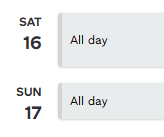
To close the loop, I wanted to share a real example. I’ve had to mark two days as “unavailable all day” in May to avoid receiving additional leads, even though I’m only booked for about 3 hours on each day. This is the situation we’re trying to highlight, as it forces us to limit our availability to avoid unnecessary costs. Have a great day, guys.
1 -
Thank you for sharing more context here. When you did the test as a customer and were able to see hours, when was that? Was that recently?
0 -
@DustiO No, I wasn’t able to see my available hours. What I did was test a time slot that I knew I had already blocked. For example, I had blocked my availability from 1:00 to 3:00 PM. I then tried to submit a request as a customer during that same time, and the system showed that I was not available and did not allow me to send the lead. So I wasn’t seeing specific available hours, but when I selected a time I knew was blocked, the platform correctly prevented the request from going through. This was some time ago, before the recent changes, when we were able to block specific time ranges, and I was not receiving leads during those blocked times.
0 -
@DustiO I understand that customers may not see hourly availability, but my concern is not about what is displayed; it’s about how leads are filtered. Previously, when I blocked specific time ranges, I did not receive leads during those hours. Now, without the ability to block time ranges, I’m receiving leads that conflict with my existing bookings, which creates a financial impact. That’s the main issue I’m trying to highlight.
1 -
Yes, @ntorrelles this was only true when Instant Book was live, but since that rolled back (in 2024) we have not actually filtered leads by specific time slots, so it makes sense that you would have seen that then.
0 -
I will be sure to share this thread with the team working on our availability features, too.
0 -
Hi @DustiO, I’m experiencing the same problem. I have been using the Thumbtack calendar as my only calendar for everything, and it used to work really well. I understand that there may be some logistics behind the system and that you think blocking whole days is equivalent, but it’s actually very different for us as pros. I used to be able to block any personal or other commitments, and whenever jobs came in, I could check my calendar to see what time I was busy and whether I had time to take on new jobs. However, there’s no way to do that anymore.
You suggested only blocking a day if the calendar is completely full, which means I wouldn’t block it if I only have a 1-hour job scheduled. But then, how do I remember that this job has already been scheduled? In that case, the availability calendar no longer serves its purpose.
1 -
@DustiO its not only that.
I spoke with the thumbtack support and they answered me saying that the only way we have is hide the service temporarily while we are working on a gig and then put it back on.
But this is not the problem for us, the big issue is listed above from many of us who are now being forced to leave the platform basically.
0 -
@Howie exactly my thought.
So we basically need to have a personal calendar where we wrote the lead we booked from thumbtack and then if another lead comes at the same window time? Are you gonna investigate with the clients and then refund us?
No…because we “had to block the whole day”.
So who exactly are gonna benefit from this? Just asking
2 -
We're adding our voice here because this calendar update is a significant step backward for pro efficiency and Thumbtack’s bottom line. We are musicians and AV vendors.
By removing the ability to block specific hours, Thumbtack has created a "lose-lose" scenario:
- Pros Lose Revenue: If we have a 2-hour gig or a personal commitment, we are now forced to block the entire day to avoid being charged for leads we physically cannot fulfill. This effectively takes us off the market for the other 10+ hours of that day.
- Customers Lose Access: Clients see a "busy" status for pros who are actually 80% available, leading them to look elsewhere or leave the platform.
- Thumbtack Loses Commissions: Every time a pro blocks a full day due to a 1-hour conflict, Thumbtack loses the potential lead fees from the rest of that day.
This isn't just an inconvenience—it’s an inefficient system that leaves money on the table for everyone involved. Please bring back hourly blocking so we can keep our calendars accurate and keep taking leads.
4 -
I did contact support about this and they said they did remove the feature of just blocking time during the day (as opposed to the entire day). At least I know I wasn't doing something wrong, but I'm ticked that Thumbtack is doing this and I suspect it's just to sell more leads (which I won't be able to use, because I'll have pre-existing gigs booked). Thanks for listening, everyone
1 -
Hi everyone — thank you all for taking the time to share your feedback on the recent calendar changes. We’ve been reading through your comments, and we hear the frustration around having less control over your schedule.
We connected with our Product team to better understand the reasoning behind this update and to make sure your feedback was shared directly. The change to remove hourly availability was part of a broader effort to align the calendar with how customers currently book on Thumbtack.
Since Instant Book was rolled back in 2024, customers are no longer selecting specific times—only preferred days. Because of that, hourly availability wasn’t actually being used in how leads are matched. We know that created a frustrating mismatch, where it seemed like setting hours would help manage availability when it actually didn’t.
This update was intended to simplify things and make your calendar more accurately reflect how leads are generated today. That said, we completely understand the need for more precise control—especially when you’re managing active jobs and availability day to day.
Customers don’t have visibility into any hourly blocks on your calendar, so those settings weren’t providing any informational benefit on the customer side either. The availability that customers can see is your business hours, which appear on your profile page. Those can be set in your “business hours” availability settings and will remain consistent unless you choose to update them.
We’ve shared your feedback (including specific examples from this thread) directly with the team, and they’re actively reviewing it as they continue improving the calendar experience.
If you receive a lead for a day you’ve marked as unavailable, please reach out to our Support team so they can take a closer look.
We really appreciate you all speaking up and continuing to invest in Thumbtack. Please keep the sharing your feedback—let’s keep the conversation going here.
0 -
As a wedding officiant, my customers need a particular time. When I could block off certain hours they would put in their time and,, if I was busy at that time, I wouldn't get the lead. Now even if I'm booked at that time I get the lead and have to pay for it. This vastly increases my costs. I am really unhappy about this, and I don't appreciate Thumbtack pretending it doesn't make any difference. It absolutely does.
1 -
@naomizf customers were not able to book specific times even before this change, customers were only able to see available days, not hours. I would recommend still submitting those leads for refunds if a customer needs a time you are unavailable for. Be sure to submit screenshots when possible, too. Sorry for the frustrations here!
0 -
I am not talking about what they SAW. I'm talking about what leads I get sent. I have NEVER gotten a request for a specific time that I was unavailable and was marked off on my calendar. That's because once they picked me, the system asks them for the date AND TIME they need, and tells them if I'm not available at that time. I don't pay for the lead. But now it will tell them I'm available and charge me for the lead.
It is downright laughable that you think I will get refunds for leads if I'm booked but can't block it off. Thumbtack has refused to give me refunds when a) the bride and the groom both have leads, saying it's not a duplicate and b) when it sent me leads that were blocked!! There's nothing in your refund policy that allows for refunds if the time ISN'T blocked, and now you've made it harder to block specific times.
@DustiO you have many, many pros here telling you this doesn't work for them but the old way did, and your response seems to be to misrepresent how the old way worked and insist nothing has changed. Which is more likely, that your users know what has gone wrong here or that you know better than them that it hasn't?2


Resources
- All Categories
- 13 Link your Thumbtack account with partner platforms
- Pro Mentorship
- 36 Comunidad en Español
- 1 Featured Events
- 15 On-Demand Webinars
- 207 Network and Collaborate
- 121 Thumbtack Pro Rewards
- 1.1K Business Resources
- 202 Inspiration
- 73 Business Resilience
- 321 Thumbtack Resources
- 327 Community News
Welcome! Check out our Community Code of Conduct. (review here)