How to Join the Thumbtack Community

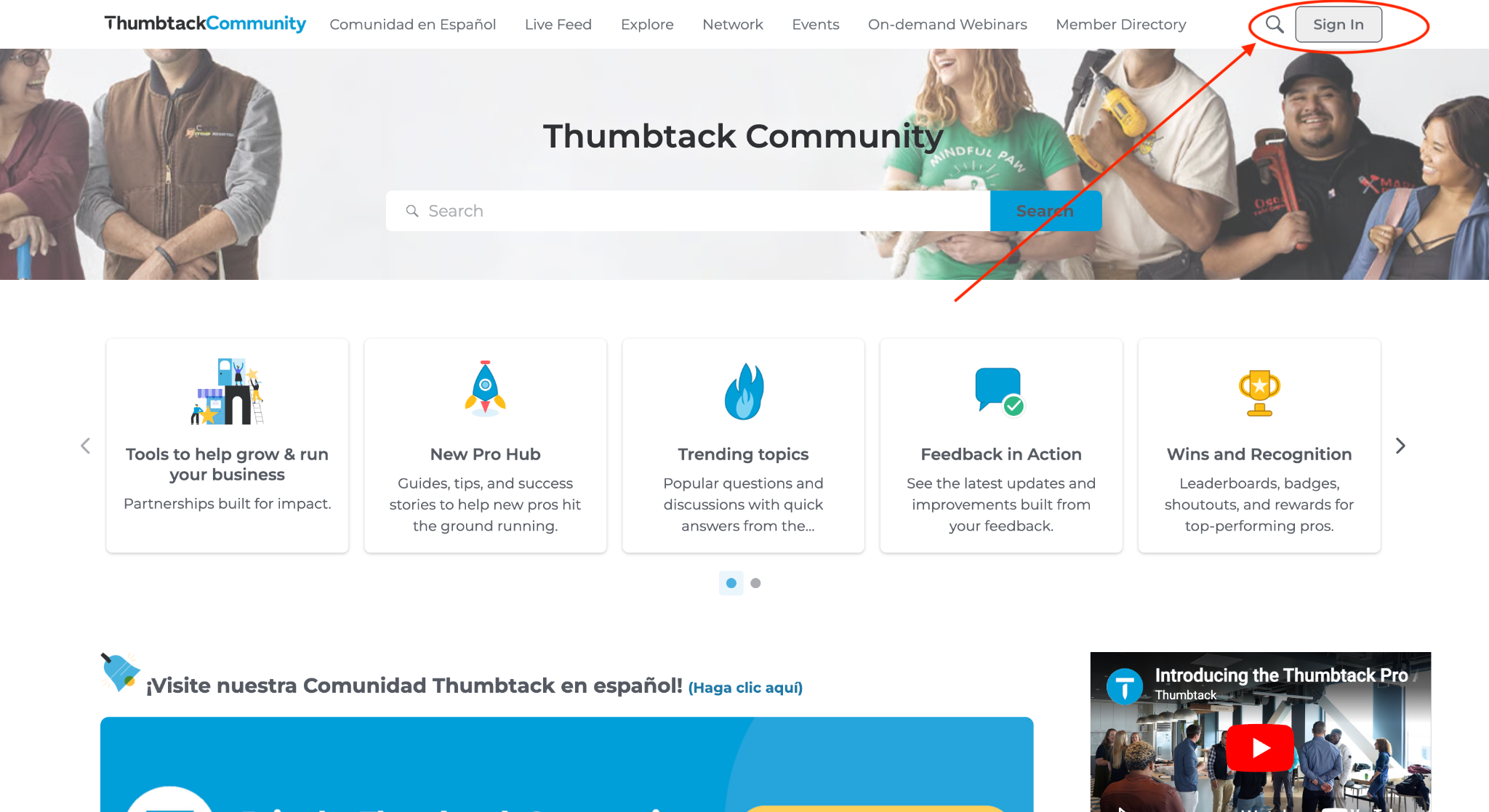
1. Sign in to the Thumbtack Community
- Click Sign In in the upper-right corner.
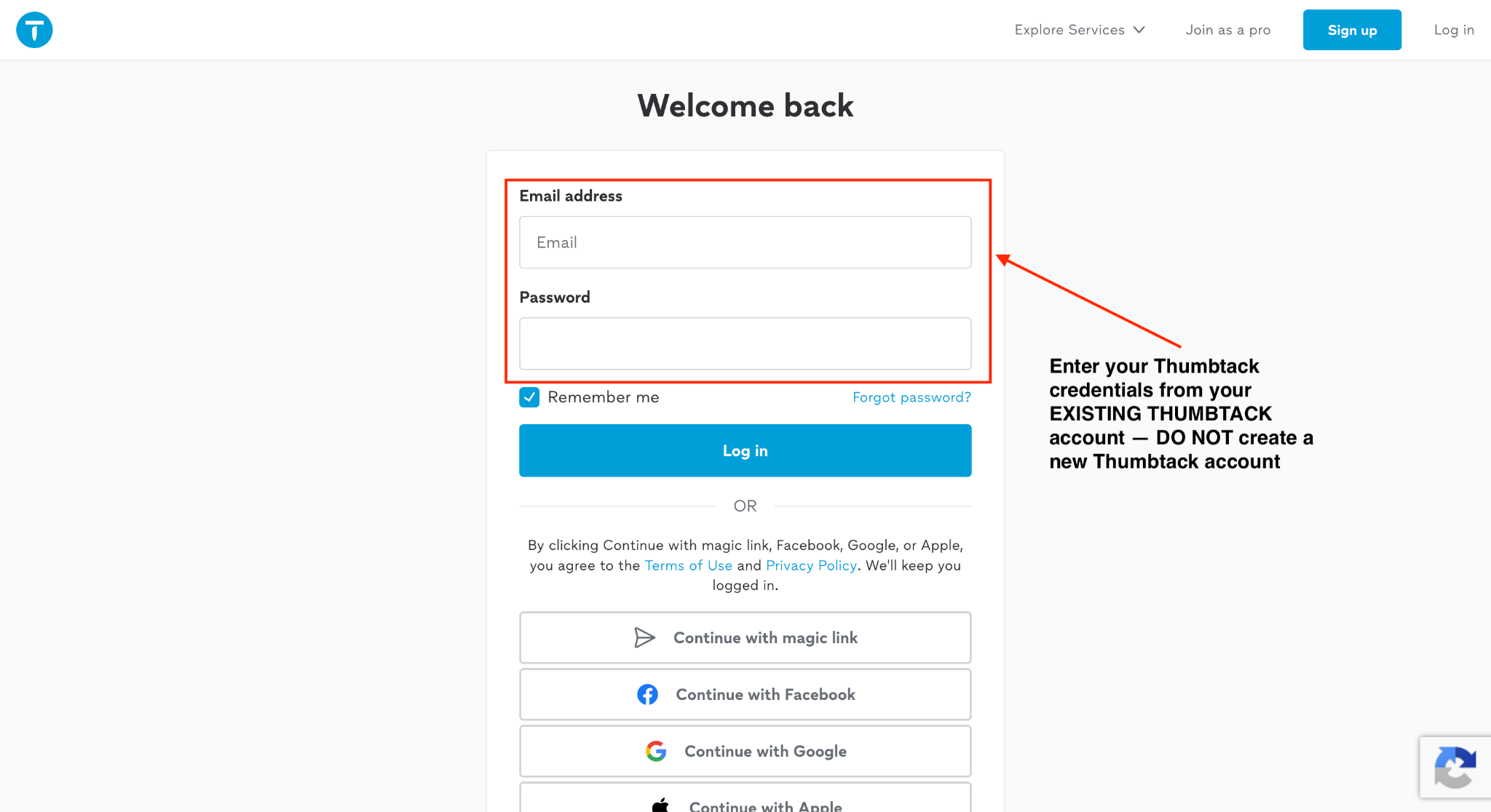
2. Log in with your existing Thumbtack account
- Enter your existing Thumbtack email address and password.
- Click Log in.
Important: Use the same email address and password you use to sign in to your existing Thumbtack account. Do not create a new Thumbtack account to access the Community.
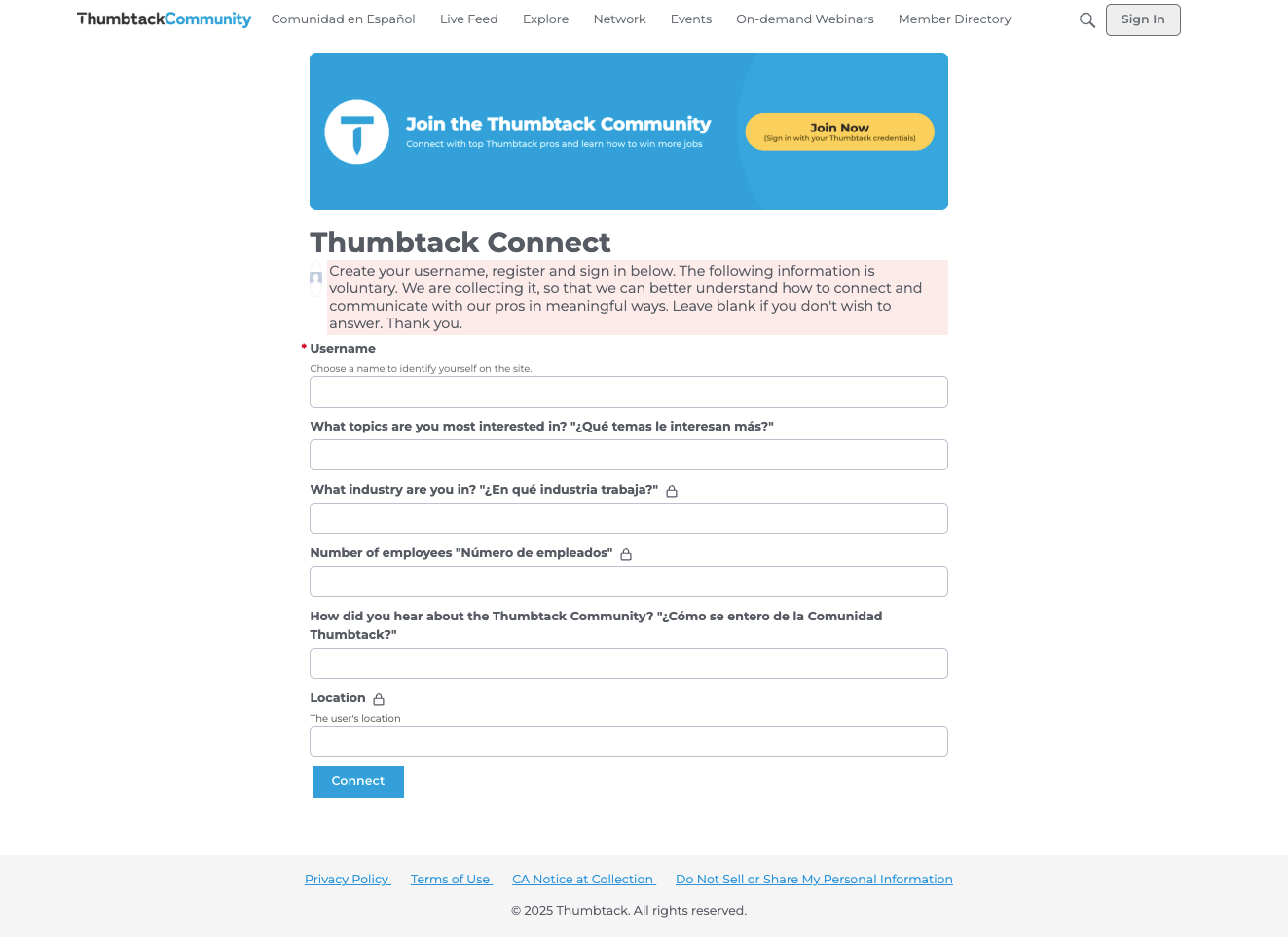
3. Complete your Community profile
- Choose a username.
- Answer a few short questions about your business.
Comments
-
Hello!
My name is William, I am the owner of W&V handyman services here in Reno, NV! I do all types of work, no job is too big or too small! Call us for a free estimate on your next project, I would love to help!!1 -
Hello everyone! 👋 My name is Wanda, and my sister-in-law and I are the owners of Triple Crown Cleaning LLC here in Tacoma, WA✨ We provide professional residential cleaning services, including deep cleaning, standard cleaning, basic cleaning, move-in and move-out cleaning, event cleaning, home organization, and more. We’re excited to connect with other local business owners and professionals here on Thumbtack. We look forward to meeting everyone and growing our business! 😊
1 -
Hello everyone. My name is Servando Segura owner of Best Choice Roofing Pros. Been working on roofs for over 20 years. We offer roof inspections, repairs and new installations. We work on residential and commercial roofs. We service Orange,Riverside, San Bernardino and LA counties in Southern California.
0 -
Hi everyone! I’m Tom, owner of Ironclad Renovation, based in Brooklyn, NY. We provide handyman services, property maintenance, renovations, installations, carpentry, and custom furniture throughout NYC and the surrounding areas.
I started the business by taking on smaller assembly and installation jobs and gradually expanded into larger renovation and maintenance projects. I’m looking forward to connecting with other professionals here and learning from the community.
Question: What has been the best way for you to grow your business and find consistent clients?
0 -
Welcome, @WilliamPreston ! 👋 Handyman work definitely keeps things interesting when no two projects are exactly the same. With you taking on everything from smaller fixes to bigger projects, I’m sure you’ve built up quite a collection of before-and-afters.
If you have a project you’re especially proud of, feel free to share it in our Share Your Projects section too. Always great to see what our pros are working on around Reno!
0 -
Hey @LegendaryL1935 , welcome! 😊 Love that Triple Crown Cleaning is something you and your sister-in-law are building together.
You also have an interesting mix of services. Deep cleans and move-outs are pretty different from home organization and event cleaning, so I’d be curious to see which ones end up becoming your strongest services as you grow on Thumbtack.
We have quite a few cleaning business owners around here, so definitely connect with them and compare notes along the way!
0 -
Welcome, @Cheva1981 ! 👋 20+ years in roofing means you’ve probably seen just about everything a roof can throw at you. 😄
Having experience across inspections, repairs, full installations, and both residential and commercial roofing gives you a lot of knowledge that newer pros could learn from too. Don’t be shy about jumping into conversations and sharing what you’ve learned over the years. That kind of firsthand experience is really valuable here.
0 -
Hello @IroncladTom , welcome! 👋 I really like the progression of your business from smaller assembly and installation jobs into renovations, custom work, and ongoing property maintenance. That’s a growth path I think a lot of newer pros here can relate to.
On finding more consistent customers, one thing we hear from Top Pros is not to treat every completed project as the end of the relationship. Following up, asking for reviews, and staying top of mind can help turn one successful job into repeat work or referrals, especially with something like property maintenance.
Glad to have you here, and I hope you’ll keep sharing what you learn as you continue growing the business!
0 -
Hi everyone! 👋✨
I’m Aldona, the founder of Mindful Spaces Organizing, a professional organizing business focused on helping people create calm, functional, and intentional spaces they truly enjoy coming home to. 🏡💚
I’ve always loved organizing, creating beautiful spaces, and finding practical solutions that make everyday life easier. Mindful Spaces Organizing grew from that passion, with a goal of making organization feel less overwhelming and more empowering. I especially love working with small spaces and taking a compassionate, judgment-free approach to decluttering and organizing.
I’m excited to connect with other Thumbtack Pros, learn from this community, share ideas, and continue growing my business. I’d also love to build relationships with other organizers and local professionals who enjoy helping people transform their spaces and lives.
My question for the community: What’s one thing you wish you knew when you first started growing your business on Thumbtack? I’d love to hear your best tips! 😊
Looking forward to meeting everyone and being part of the community! 🌿✨
2 -
Welcome to the Community, all—we are so happy to have you here. I love hearing your stories and your great questions!
I'm tagging in some of our Thumbtack Pro Advisors who may have some great tips: @ShaquealThomas @AR2i @Bretdouglas67@Bretdouglas @busyb @amccarthy @MaidThis_SLC @Chuva @ClayRiser @CodyRisner @AntilleanRestoration @callargo @Jack_Marquardt @Juliano_50 @Nick_Bennett @PhilZDPDX @Bkhomeservice @Cliff @TechExpert @SheilaHarris @Frederick_Haywood @JWC @Jonathan_Stickland @kdiddy01 @AR2i @DreamClean @MarlonC @Shanez_Padgett
0 -
Hi, and welcome! One thing I wish I knew when I first started is how important it is to be proactive with your profile. I made the mistake of setting up what I thought was a good profile and then just letting it run on autopilot. Now I set aside at least an hour every week to look through my leads and see what’s working and what needs to be adjusted. Even something as simple as changing the areas I target from week to week can make a pretty big difference. I definitely wish I had known this when I first started!
0 -
Welcome!
One thing I wish I knew earlier….don't be afraid to list higher prices than your "competitors."
Some customer want and desire premium service. I felt the need to match or beat others. That was the wrong perspective.1 -
@Jonathan_Stickland I couldn't agree more — as a former business owner and Thumbtack Pro and as someone who has hired dozens of Thumbtack Pros over the years, I never go with the lowest price. I rely on the reviews I see and the quality of work the pro does and mentally I just kind of always dismiss the lowest price and typically end up with someone whose prices lands in the middle or higher range. And, as a pro I also learned this lesson early on — understand the value of your time and your service!
1 -
Hello . I'm Nicole I'm the owner of the ledgendary cleaner llcjust got my license .
I've beenI've been over 20 years and I'm happy to join.Look forward she's growing the business immediately.People.Thanks for having me
1 -
@ Aldonamc24 sorry for the delay in responding. Super busy thanks in large part to Thumbtack. I'm a home organizer and movement specialist in CO and there is no doubt my business trajectory changed as a result of joining this platform 6 years ago. I hustled hard to get a very high conversion rate and became a top pro rather quickly. I've also been on the Thumbtack Pro Advisory Board since it's inception in 2023 and will be at the first in person meeting in San Francisco since that first year at the end of this month. I would be happy to connect and do a Zoom call if you would like me to review your profile and give you some tips and tricks I've learned through the years. Feel free to reach out at 720-637-2492. And feel free to look at my website or Thumbtack profile. My company is It's Just Stuff in Boulder.
1




Resources
- All Categories
- 1.5K Atlanta Pro Community
- 93 Pro AI Hub
- 975 New Pro Hub
- 5 PAB & PPC corner
- 539 Trending topics
- 220 Feedback in Action
- 89 Wins and Recognition
- 21 Tools to help grow & run your business
- Pro Mentorship
- 274 Comunidad en Español
- 3 Featured Events
- 506 On-Demand Webinars
- 207 Network and Collaborate
- 361 Thumbtack Pro Rewards
- 1.9K Business Resources
- 280 Inspiration
- 168 Business Resilience
- 340 Thumbtack Resources
- 666 Community News
Welcome! Check out our Community Code of Conduct. (review here)