Remove Direct Leads

I'd like to remove the direct leads function and just receive the general leads that you pay ONLY if the prospect replies. The direct leads are not working out.
Answers
-
Hi @vroomer64 and thanks for posting! Can I ask what with direct leads is not working out? ie are you getting jobs that aren't a good match, are the lead prices too expensive, etc? If you let me know I can take a look at your settings and see if there is anything I can help with in regard to direct leads.
Otherwise, you always can just utilize the "opportunities", however you'll need to keep in mind that those are from customers who have already found a pro they liked and reached out to them directly (and either they didn't hire the pro, the pro hasn't responded, etc), so the response rate on those is pretty low.
Your best best is always to get those direct leads, since those are customers who have picked you specifically. But, if those aren't working for you, I'd love to try and figure out why!
0 -
Hi,
Your lead prices are too high, the closing ratio is abysmal, and the prospects are too incommunicative.
Best,
Paul
2 -
Actually the response rate for reaching out through opportunities is pretty good, in my experience.
0 -
@structuralguy65 It probably depends on the category :) Overall I think the response rate is pretty low, but so is the risk, since you don't pay unless they respond. So always worth at least trying it!
0 -
This content has been removed.
-
having a serious issue with the direct leads, I have gotten charged two times already 1 of them was in Carrollton and I live in Virginia Beach. That is a very far drive for a maybe not even an appointment not even a booking is a maybe and then I got another one. when I first signed up all I saw all over the app was don’t pay unless the customer which to I had to contact them for them to be able to contact me for y’all to get the money until I had to dig for almost 2 hours just to find that direct auto pay lead and I would never have approved I known that also my settings were set to area to be around Chesapeake. You know what I mean so both of those jobs did not pay out and I am out $129.
1 -
Hi @SnCAirMaster26119 , first, apologies for the delayed response, and thanks for taking the time to share your experience.
It sounds like your main concern is that the Direct Leads you were charged for didn't seem to align with the service area you had configured. If you've already reviewed your targeting preferences and everything looks correct, I'd recommend reaching out to support@thumbtack.com with the lead IDs and a description of what you experienced. That will give the team the details they need to review how those leads matched your targeting and provide additional context.
I also appreciate you sharing your experience with the Direct Leads setup. Feedback like yours helps the team better understand where the experience may be unclear for pros, especially when they're getting started.
Thanks again for taking the time to share your feedback with the Community.
0 -
This new auto matching thing is terrible. I got automatically matched for 10 jobs in a month and none of them were a good fit. I'm pausing my jobs.
0 -
@Perfectlyplaced can you tell me a little bit more about what you mean by "new auto matching" so I can look into it for you?
If you are referring to the new Smart Matching feature, you can actually toggle that off:
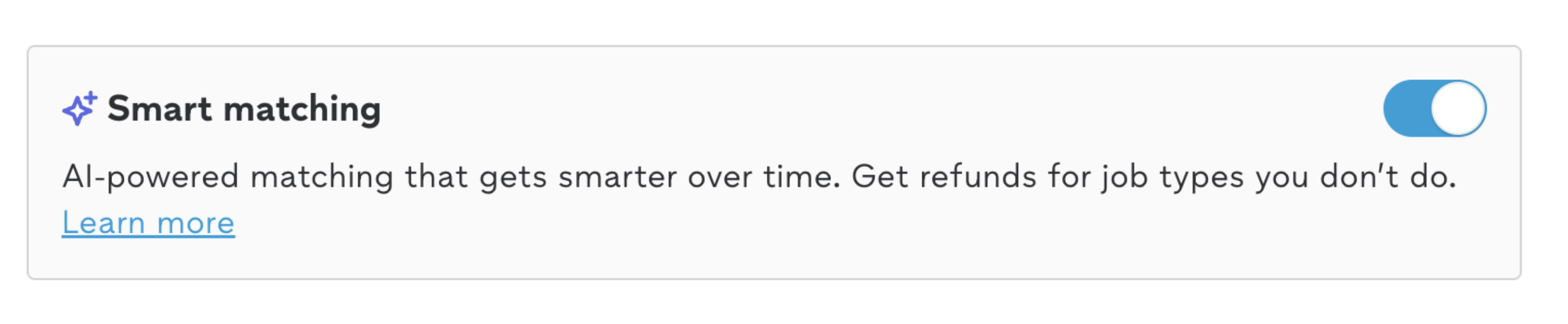 0
0 -
Yes, the smart matching is what I was referring to. I was charged for 10 "smart matches" that weren't good matches at all during a month of services. I much prefer choosing which leads are a good fit.
0 -
I'd like to reduce my coverage area on my profile but there is only a button to add coverage areas instead of removing them.
0 -
Hi @Perfectlyplaced !
You should be able to update your travel area at any time by going to Services, selecting the service you'd like to edit, and then opening Travel areas to adjust the areas you serve.
We also have a short Help Center video that walks through managing your job preferences. If you're specifically looking for travel areas, I'd recommend fast forwarding to 1:04–1:17, where it shows how to update them:
If you're only seeing an option to add coverage areas and not remove them, could you let us know if you're using the mobile app or the website? A screenshot would also be helpful so we can better understand what you're seeing.
0


Resources
- All Categories
- 19 Atlanta Pro Community
- 3 Pro AI Hub
- 141 New Pro Hub
- 5 PAB & PPC corner
- 41 Trending topics
- 29 Feedback in Action
- 7 Wins and Recognition
- 22 Tools to help grow & run your business
- Pro Mentorship
- 44 Comunidad en Español
- 3 Featured Events
- 15 On-Demand Webinars
- 207 Network and Collaborate
- 141 Thumbtack Pro Rewards
- 1.2K Business Resources
- 208 Inspiration
- 78 Business Resilience
- 342 Thumbtack Resources
- 386 Community News
Welcome! Check out our Community Code of Conduct. (review here)